
Call screening and spam blocking apps that reduce scam exposure
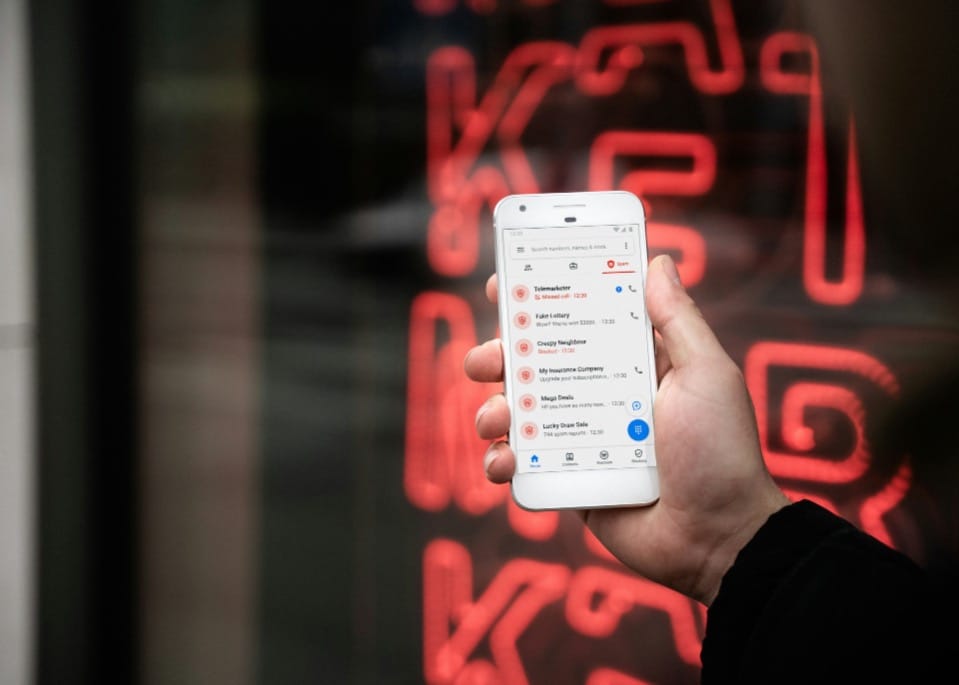
Scam calls succeed because they interrupt you at the wrong moment. Call screening reduces how often that moment even happens.
🔴 You might also like to read:
 Liz Thorne
 Liz Thorne
Your phone number is the front door to your banking, your WhatsApp, your side hustle, and half your logins. Scammers know it, which is why smishing and vishing chains have become the go-to opener for theft, SIM swaps, and account takeovers.
Call screening is not about being antisocial. It is about refusing to treat every unknown number like it deserves your attention, especially when one-time pins and “urgent verification” calls are the bait.
Why call scams still work in 2026
A scam call succeeds for one reason: it rushes you into a decision. The number might look local, the person might sound confident, and the script often borrows the language your bank, courier, or network provider uses.
Phone-based scams also scale well in South Africa because:
- A call costs less effort than a long email.
- WhatsApp voice notes and calls blur the line between “random” and “someone from a group”.
- SIM swap fraud turns your number into a master key if the scammer can grab your OTPs.
Scam calls do not win through clever tech. They win by getting you to talk, answer questions you did not plan to answer, and act before you verify anything. Call screening exists to break that chain early.
What call screening apps can do, and what they cannot
Call screening tools sit in three lanes:
1) Identify and label calls
Caller ID databases and carrier data can flag “suspected spam”, “scam likely”, or show a business name.
2) Filter and silence unknown calls
Some tools send unknown callers to voicemail or a separate list, so your phone stops lighting up all day.
3) Block patterns
Repeated calls from the same number, spoofed formats, or known scam lists can be blocked automatically.
Call screening cannot guarantee safety. Spoofing exists, scammers rotate numbers, and a “clean” number can still carry a scam script. The goal is smaller: fewer interruptions, fewer accidental answers, and more time to verify before you speak.
This is not about finding a magical app. It is about making unknown calls work harder to reach you, not the other way around.
🔴 You might also like to read:
 Liz Thorne
The best options in South Africa
Option 1: Built-in tools first
iPhone (Apple)
Apple offers call filtering options for unknown numbers that reduce interruptions, without needing a third-party directory app.
Android (Google Phone app on many devices, especially Pixel)
Google’s Phone app supports caller ID and spam protection, with an option to filter spam calls.
Samsung (Smart Call, powered by Hiya on many Galaxy devices)
Samsung’s Smart Call flags suspected spam or fraud calls, with settings under caller ID and spam protection.
This lane has the best trade-off for most people: fewer permissions, fewer moving parts, and fewer reasons to hand your contacts to another company.
Option 2: Truecaller, powerful, but read the privacy fine print
Truecaller is popular in South Africa for a reason: it can identify unknown callers and block known spam patterns. It can also be a privacy compromise depending on how you configure it, because services like this rely on large identity databases and data processing.
Truecaller’s own privacy policy explains how it collects and processes personal information, which is worth reading before you grant permissions.
If you want Truecaller for the caller ID benefits, treat it like a finance app:
- Only grant permissions you understand.
- Avoid syncing more than you need.
- Recheck settings after updates.
Option 3: “Silence unknown callers” as a lifestyle, not a setting
One underrated scam defence is simple: unknown numbers do not deserve instant access to you.
If you keep missing legitimate calls (deliveries, doctors, recruiters), call screening works best with a basic rule: save numbers you truly expect, and filter the rest into a list you check on your terms. Apple and Android both support versions of this, and Samsung devices offer similar controls through Smart Call.
A sane setup for a scam-heavy country
Most people do not need five apps. A good setup usually looks like this:
- Turn on your phone’s built-in spam identification and filtering.
- Silence or filter calls from unknown numbers.
- Use a third-party app only if you still get hammered by spam, or if your phone’s dialler is weak at identifying junk calls.
- Treat OTP requests as an automatic red flag, even if the caller sounds legitimate.
Consumer fraud guidance in South Africa is blunt for a reason: OTPs do not get shared over the phone, no matter who the caller claims to be.
A bank does not need you to read out an OTP to “reverse fraud”. A courier does not need your OTP to “confirm delivery”. A network provider does not need your OTP to “secure your account”. The moment a caller asks for it, the call is already over.
Privacy, permissions, and the part people ignore
Call screening lives in a messy place: to identify calls, a service needs data. Your job is to decide whose data practices you trust.
A quick reality check before installing anything:
- If an app wants your contacts, ask what you get in return, and what it does with that list.
- If it wants SMS access, understand that it could see verification messages.
- If it wants full call log access, know that it can build a detailed picture of your behaviour.
This is why “built-in first” is a strong default for many users. Apple, Google, and Samsung all document how their call filtering and spam protection options work.
🔴 You might also like to read:
 Anchen Coetzee
Comments ()